We Didn't Build Another Lead Form. We Built a Lead Processing System.
Most businesses don't actually have a lead generation problem.
They have a lead management problem.
A lead comes through a website. Someone checks the form. Someone copies the information into a spreadsheet or CRM. Someone decides whether the lead is relevant. Someone sends an email. Someone assigns the lead to a salesperson. Someone creates a reminder for the follow-up.
When the number of leads increases, the process becomes harder to maintain.
That was the problem we wanted to solve at 5Stacks.
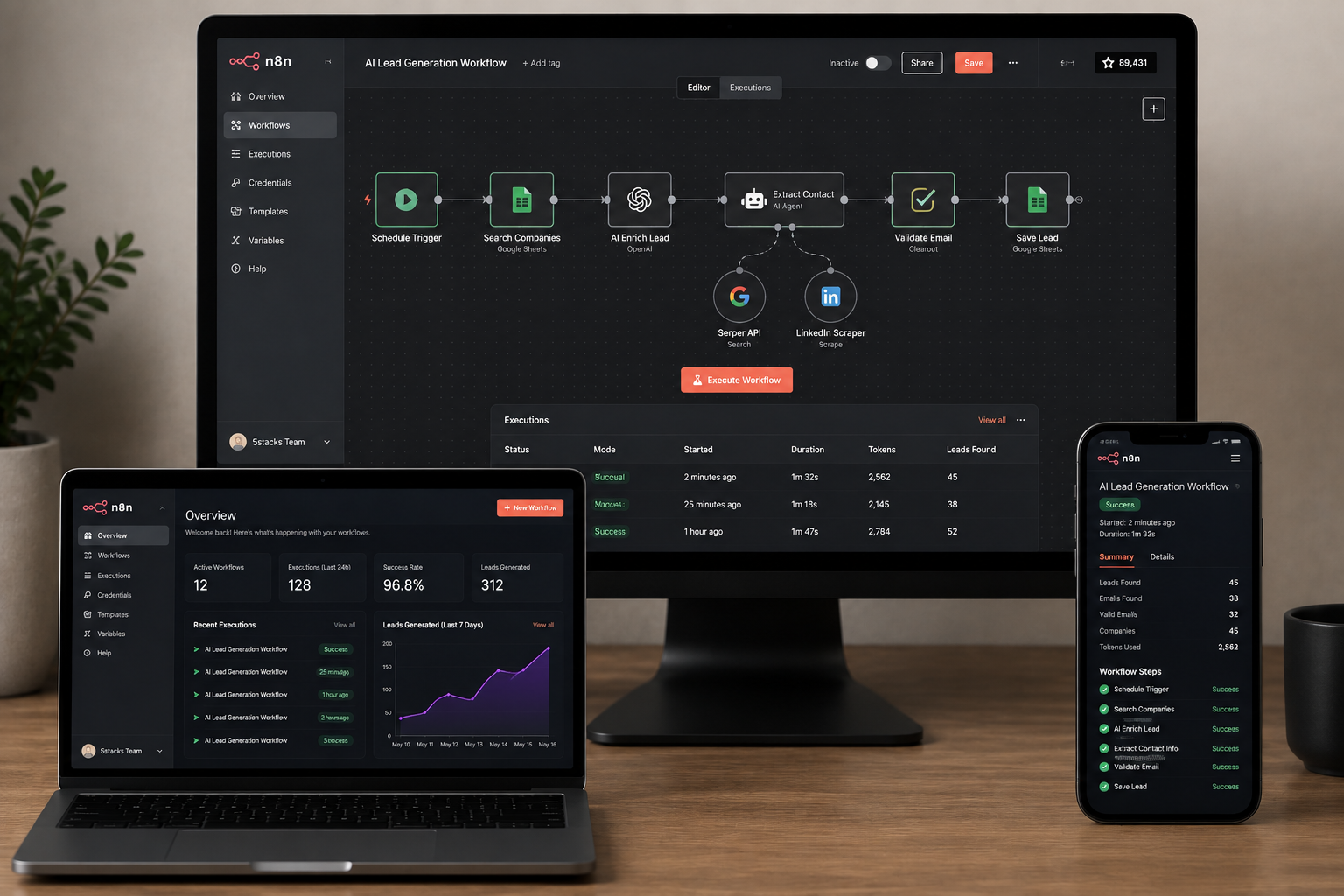
Instead of building another form that simply sends an email notification, we built a production-grade AI-powered workflow automation system capable of receiving business data, processing it, making decisions, routing it to the right destination and triggering follow-up actions automatically.
The core of the system is n8n, connected with APIs, webhooks, AI processing, Google services, email systems and business data sources.
The Problem We Wanted to Solve
Consider a typical B2B lead workflow:
| Step | Traditional Process | Problem |
|---|---|---|
| 1 | Lead submits a form | Information waits for someone to process it |
| 2 | Employee checks lead | Manual qualification |
| 3 | Data entered into CRM | Duplicate data entry |
| 4 | Salesperson notified | Communication delay |
| 5 | Follow-up scheduled | Easy to forget or delay |
None of these individual tasks are particularly difficult.
The problem is that they are repeated hundreds or thousands of times.
That makes them ideal candidates for automation.
The Objective
Our objective was simple:
When a lead enters the system, the business should not have to manually move information from one platform to another.
The system should be able to:
- Capture the lead
- Validate incoming information
- Process and classify the lead
- Apply AI-based decision logic where required
- Route information to the correct system
- Trigger notifications
- Start email communication
- Create or update business records
- Handle API failures
- Retry failed operations
- Continue running without someone watching the workflow
That requirement changed the project from a simple automation into a complete business workflow architecture.
The Architecture Behind the System
The system was designed as a collection of connected services rather than one large application.
At the center is the automation engine. Different services communicate through APIs and webhooks, while AI processing is introduced wherever the workflow requires interpretation or decision-making.
                ┌─────────────────────┐
                │   WEBSITE / FORM    │
                │    Lead Capture     │
                └──────────┬──────────┘
                           │
                           ▼
                ┌─────────────────────┐
                │      WEBHOOK        │
                │   Data Reception    │
                └──────────┬──────────┘
                           │
                           ▼
                ┌─────────────────────┐
                │    VALIDATION       │
                │ Data Cleaning       │
                │ Duplicate Checks    │
                └──────────┬──────────┘
                           │
                           ▼
                ┌─────────────────────┐
                │    AI PROCESSING    │
                │ Classification      │
                │ Intent Detection    │
                │ Decision Logic      │
                └──────────┬──────────┘
                           │
                    ┌──────┴──────┐
                    │             │
                    ▼             ▼
             ┌────────────┐ ┌────────────┐
             │   CRM /    │ │  Email &   │
             │  Database  │ │ Notification│
             └─────┬──────┘ └──────┬─────┘
                   │               │
                   └───────┬───────┘
                           ▼
                ┌─────────────────────┐
                │ FOLLOW-UP WORKFLOW  │
                │ Scheduled Actions   │
                │ Reminders            │
                │ Further Processing   │
                └─────────────────────┘
This architecture makes each stage independent enough to modify without rebuilding the entire system.
Why We Used n8n as the Automation Engine
We selected n8n because the problem was not limited to one API or one application.
The system needed to orchestrate multiple services while keeping the workflow understandable and maintainable.
Instead of writing hundreds of isolated scripts, n8n provides a visual workflow layer where individual operations can be connected into a larger business process.
| Requirement | Implementation |
|---|---|
| Receive external data | Webhooks / APIs |
| Process data | n8n workflow nodes |
| Intelligent decisions | AI processing and conditional logic |
| External services | REST APIs |
| Communication | Automated email and notifications |
| Reliability | Error handling and retry workflows |
What Happens When a New Lead Arrives?
This is where the automation becomes useful.
A lead does not simply enter a database.
It passes through a sequence of automated decisions.
01 → Capture
The website or connected platform sends the lead information to the automation workflow.
02 → Validate
The workflow checks whether the required information exists and whether the incoming data is usable.
03 → Normalize
Information from different sources is converted into a consistent format before being passed to other systems.
04 → Understand
AI processing can interpret the lead's message, requirements, intent or other contextual information.
05 → Decide
Conditional workflow logic determines what should happen next.
06 → Route
The information is sent to the appropriate CRM, database, communication channel or internal process.
07 → Respond
Automated emails or notifications can be triggered based on the result.
08 → Follow Up
Additional actions can be scheduled without requiring someone to manually create a reminder.
Where AI Fits Into the Workflow
AI is not useful simply because it is called AI.
The important part is where AI is introduced into the business process.
For example, traditional automation can easily answer:
If lead source = website, send notification to sales.
But businesses often need more contextual decisions.
For example:
A lead describes a requirement in natural language. The system needs to understand the requirement, determine its relevance and decide which workflow should handle it.
This is where AI processing can sit between the input and the business logic.
RAW LEAD
   │
   ▼
AI UNDERSTANDING
   │
   ├── Relevant → High Priority Workflow
   │
   ├── Relevant → Standard Follow-up
   │
   ├── Unclear → Human Review
   │
   └── Invalid → Ignore / Log
The important design principle is that AI does not need to control everything.
It can be placed exactly where interpretation is required while deterministic workflow logic handles predictable operations.
Lead Qualification Without Constant Manual Checking
In a manual process, someone has to open a lead, read it and decide what should happen.
With an intelligent workflow, the same decision process can become part of the system.
| Input | Processing | Action |
|---|---|---|
| New inquiry | Validate | Create lead |
| Detailed business requirement | AI classification | Priority handling |
| Incomplete information | Validation rules | Request additional information |
| Existing contact | Data matching | Update existing record |
API Orchestration: Connecting the Business Stack
A major part of the system is not the AI model itself.
It is the ability to move information reliably between different applications.
Modern businesses often use separate tools for:
- Website forms
- CRM
- Google services
- Databases
- Internal dashboards
- Marketing platforms
- Communication systems
Without integration, employees become the bridge between those systems.
That is exactly what automation should eliminate.
Website
↓
API / Webhook
↓
n8n Automation Layer
↓
AI + Business Logic
↓
CRM / Database / Google / Email / Internal Systems
Error Handling Is Part of the Product
A workflow that works only when everything goes perfectly is not production-ready.
External APIs can fail.
Authentication tokens can expire.
Services can temporarily become unavailable.
Data can arrive in an unexpected format.
For this reason, error handling was treated as part of the architecture rather than an afterthought.
| Failure | System Response |
|---|---|
| Temporary API failure | Retry workflow |
| Invalid input | Validation / exception path |
| Unexpected response | Error handling branch |
| Workflow failure | Logging and controlled recovery |
This distinction matters when automation becomes part of a real business operation.
From Linear Automation to Modular Automation
One of the architectural decisions we focused on was modularity.
Instead of creating one enormous workflow, individual responsibilities can be separated into logical components.
MODULE 1
Lead Capture
      ↓
MODULE 2
Validation
      ↓
MODULE 3
AI Processing
      ↓
MODULE 4
Business Rules
      ↓
MODULE 5
CRM / Data
      ↓
MODULE 6
Communication
      ↓
MODULE 7
Follow-up
      ↓
MODULE 8
Monitoring / Error Handling
This makes the system easier to maintain and allows new integrations to be added without redesigning the entire architecture.
Automation vs Manual Operations
The difference becomes clearer when the two processes are placed side by side.
| Manual Process | Automated Process |
|---|---|
| Employee checks new lead | Workflow receives lead automatically |
| Employee copies information | API transfers data |
| Employee reads and categorizes | AI + business rules process information |
| Employee sends notification | Notification is triggered automatically |
| Employee creates reminder | Follow-up workflow schedules next action |
| Employee monitors every step | System executes continuously |
Where the Time Saving Comes From
Automation does not magically make every business process faster.
What it does is remove repetitive human actions from the critical path.
Manual intervention
Automated intervention
The visual above illustrates the reduction in manual touchpoints rather than claiming a specific percentage of time saved. Actual savings depend on the business workflow and lead volume.
What the System Automates
- Lead capture: Incoming leads can automatically enter the workflow.
- Lead processing: Information can be validated and normalized before further processing.
- AI classification: Natural-language information can be processed where intelligent interpretation is required.
- Data routing: Information can be sent to different destinations according to business rules.
- API orchestration: Multiple services can communicate through a centralized workflow layer.
- Email automation: Relevant communication can be triggered automatically.
- Follow-ups: Subsequent actions can be scheduled without manual reminders.
- Error handling: Failed operations can follow controlled recovery paths.
- Internal communication: Teams can receive automated updates when specific events occur.
Why This Is More Than an n8n Workflow
It is easy to look at an automation project and say:
"It's just an n8n workflow."
That misses the engineering problem.
The difficult part is deciding:
- What information enters the system?
- What information should be trusted?
- Where should validation happen?
- Where does AI actually add value?
- Which decisions should remain deterministic?
- Which system owns the data?
- What happens when an API fails?
- How should duplicate data be handled?
- What should happen when AI cannot confidently classify something?
- How should the system scale when lead volume increases?
Those are architecture questions, not simply workflow questions.
Designed for 24/7 Business Operations
The biggest advantage of this architecture is not that it can execute one workflow.
It is that the workflow can continue operating when nobody is sitting in front of a computer.
24 / 7 AUTOMATED OPERATIONS
Lead Capture → Processing → Decision → Routing → Communication → Follow-up
A business can therefore move from people constantly pushing information between systems to a model where systems communicate directly with each other.
The Business Impact
The system was designed around operational outcomes rather than technology for its own sake.
| Before Automation | After Automation |
|---|---|
| Repeated manual data entry | Automated data movement |
| Manual lead checking | Automated processing |
| Delayed internal communication | Event-driven notifications |
| Manual follow-up reminders | Automated follow-up workflows |
| Disconnected tools | Connected business systems |
| Human-dependent processes | System-driven operations |
The result is a business workflow that can process information faster, reduce repetitive work and continue operating without requiring someone to manually move every piece of data.
What We Learned From Building It
The biggest lesson was that automation should start with the business process, not the technology.
Starting with "Where can we use AI?" usually produces unnecessary complexity.
A better approach is:
1. Identify repetitive work.
Find the tasks employees repeatedly perform.
2. Map the information flow.
Understand where the data comes from and where it needs to go.
3. Separate rules from intelligence.
Use deterministic logic for predictable decisions and AI where interpretation is genuinely required.
4. Build failure paths.
Assume that APIs, data and external services will sometimes fail.
5. Make the workflow observable.
A production system needs logs, error handling and ways to understand what happened.
6. Design for change.
Businesses add tools, change processes and increase their volume. The architecture should accommodate that.
Where AI Business Automation Can Go Next
Lead processing is only one possible application.
The same architecture can be extended to other business processes:
- AI customer support workflows
- CRM automation
- Sales follow-up automation
- Automated reporting
- Document processing
- Internal approval workflows
- Marketing automation
- Customer onboarding
- Data synchronization
- AI-powered business assistants
- ERP and CRM integrations
The underlying principle remains the same:
Connect the systems, automate the repetitive work and introduce intelligence where human judgment is actually needed.
Our Approach at 5Stacks
At 5Stacks, we don't treat AI automation as a collection of disconnected tools.
We look at the complete business process first.
Then we determine where software, APIs, automation and AI can remove unnecessary manual work.
That can mean building an n8n workflow, developing a custom API, connecting an existing CRM, creating a custom software layer or combining several of these into one architecture.
The technology should fit the process — not the other way around.
Final Takeaway
AI automation becomes valuable when it is connected to real business operations.
A chatbot on its own may answer questions.
An AI workflow connected to a business can actually receive information, understand it, make decisions, update systems and trigger actions.
That is the direction we explored with this 5Stacks in-house project.
By combining n8n, APIs, webhooks, AI processing, automated communication and modular workflow architecture, we created a foundation for business processes that can run continuously with significantly fewer manual touchpoints.
FROM MANUAL WORK
↓
TO CONNECTED WORKFLOWS
↓
TO INTELLIGENT BUSINESS AUTOMATION
That is what we believe the next generation of business software should look like.
Frequently Asked Questions
What is an AI lead generation automation system?
How does n8n help with lead generation?
Can AI automatically qualify sales leads?
Can n8n connect a website with a CRM?